 SexCamsVR
What Are VR Cams? How Live VR Cam Shows Work
Reviewed by the SexCamsVR VR team — editorial policy
The short answer
A VR cam is a live webcam show streamed in stereoscopic 3D. Instead of watching a flat 2D video on a screen, the performer is filmed with a VR camera and appears in your headset with real depth and presence — as if they were in the room in front of you. Everything else about it works like a normal live cam: it streams in real time, and you can chat and tip.
The part that surprises most people: there's nothing to install. The show runs directly in your headset's web browser. You open the site, pick a live room, and switch to VR mode.
How VR cams work
Live VR cams play directly in your headset's web browser using WebXR — the browser standard for immersive content. That means:
- No app to download. You don't install anything from a store.
- No PC. A standalone headset is all you need; there's no gaming computer or cable in the loop.
- No special player. The headset's built-in browser does the work (with one exception — Pico headsets, covered below).
The flow is simple: open the cam site in your headset's browser, pick a live room, then tap the player's "Enter VR" control to drop into the immersive view. Our step-by-step guide to watching VR cams runs through that sequence in order for any headset.
Note: Whether a given room is actually broadcasting in VR is reported by the platform's provider feed (a
broadcastVRflag) rather than something verified stream-by-stream on our side. When the feed marks a room as VR, that's what switches on the immersive view.
The VR180 format, explained
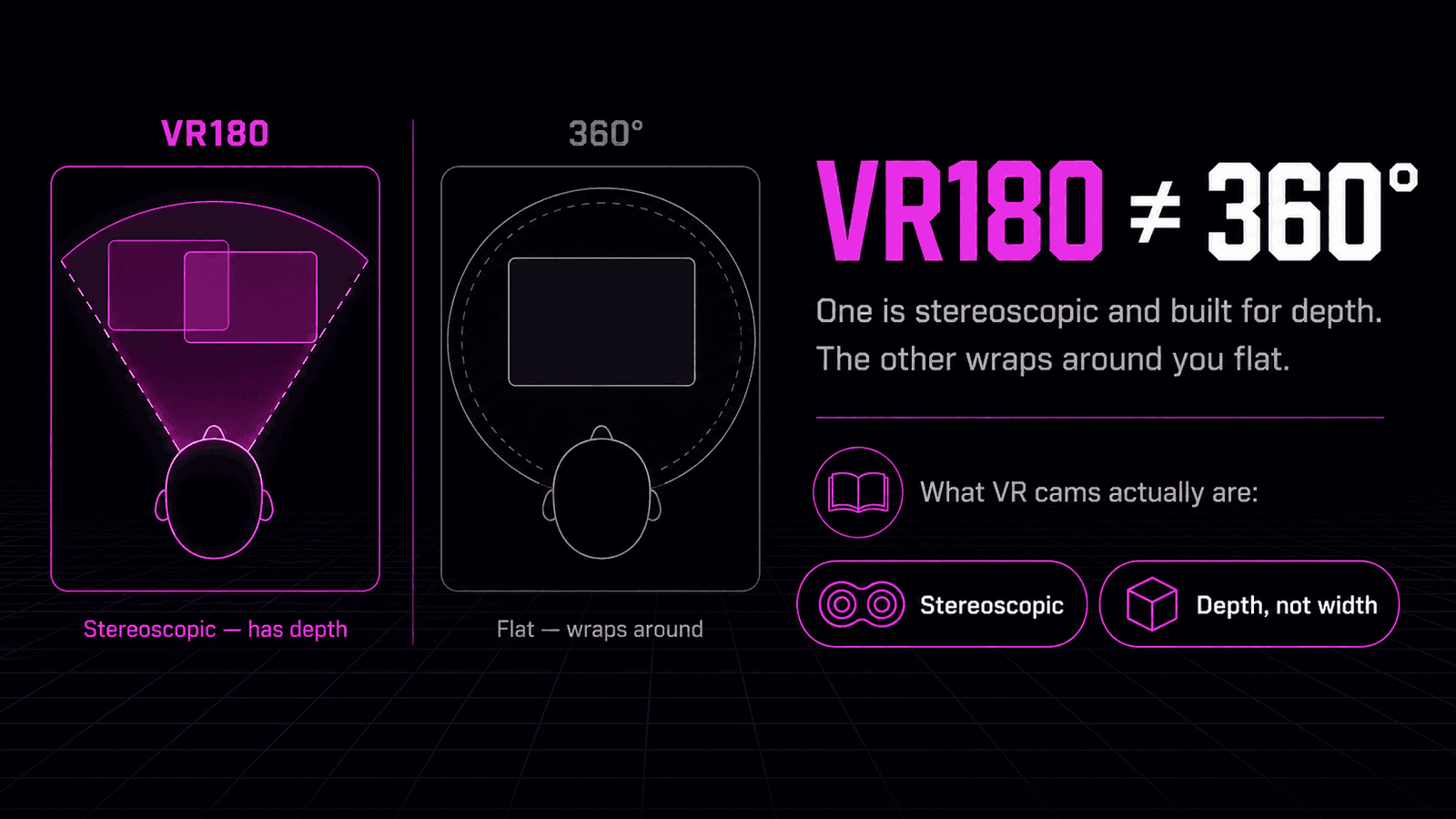
Live VR cams are filmed in VR180 — stereoscopic 180°. That's a forward-facing 3D field of view, not a full 360° sphere you can spin all the way around in.
VR180 is the standard for live cams for good reasons:
- It's built for a single subject. The performer and the part of the room that matters are in front of the camera. There's no point spending image quality on the empty space behind it.
- It delivers strong close-up depth. Two forward-facing lenses capture a separate image for each eye. Your brain reads the small differences between them as depth — which is what makes the scene feel present rather than flat.
- It's simpler and higher quality than full 360°. A 360° stream spreads its resolution and bandwidth across the whole sphere. VR180 concentrates everything into the forward hemisphere, so at the same total resolution far more detail lands where you're actually looking.
In short: for a live, single-subject scene, VR180 is the sweet spot between immersion, image quality and what's practical to broadcast.
2D cams vs VR cams
| 2D cam | VR cam | |
|---|---|---|
| Image | Flat window | Stereoscopic 3D with real depth |
| What you watch on | Any screen — phone, laptop, TV | A VR headset |
| Browser needed | Any standard browser | A WebXR-capable headset browser |
| Framing | Fixed — you see what the camera frames | Adjustable — you can change the viewing distance inside VR |
The core experience — a live performer, chat, tipping — is the same. VR adds depth, scale and a sense of being in the room.
What to expect when you watch
When you open a VR cam site in your headset and enter VR, the room grid wraps around you in 3D. You browse simply by looking around (or clicking and dragging), then open a room to watch that performer live. The player has a VR / 2D toggle, so you can drop back to a flat window any time and re-enter VR when you want. For a closer look at the live show itself, see VR cam shows explained.
Chat and tipping work exactly like a normal 2D show. You type messages and send tips through the platform's standard interface. The "VR" part is about how the video reaches your eyes — it's a viewer-side experience. The interaction itself runs through the same controls a 2D viewer uses.
Good to know: "VR" here describes how you watch. You don't need any special hardware beyond a headset, and you interact through the normal on-screen interface.
Free vs paid
Most of this works the way ordinary cam sites do. Many platforms let you browse and watch public VR rooms for free, often without even creating an account. Private shows and tipping use the platform's normal token or credit system.
Pricing varies from one platform and provider to the next, so there's no single rate to quote — but the model is familiar: public rooms are open, and you spend tokens when you tip or go private. For a fuller breakdown of what's free and where paying starts, see are VR cams free?
What you need
The only real requirement is a WebXR-capable VR headset:
- Meta Quest — uses its built-in browser, which supports WebXR natively. The most popular and affordable starting point.
- Apple Vision Pro — uses Safari (on visionOS 2 and later), with WebXR enabled.
- Pico — works, but its built-in browser's WebXR support is limited, so installing the free Wolvic browser makes VR playback more reliable.
If you're deciding which headset to buy, see our best VR headset for live cams guide, and for a browser-by-browser comparison see best browser for VR cams. Once you have a Quest, our how to watch VR cams on the Meta Quest 3 guide walks through the playback details. No headset at all? You can still watch VR cams on a flat screen.
Bottom line
A VR cam is a live cam show you watch in stereoscopic 3D, streamed straight to your headset's browser in the VR180 format — no app, no PC, no download. It looks and works like a normal live show, with chat and tipping intact, but the performer appears with real depth and presence instead of on a flat screen.
Ready to see it for yourself? Browse our live VR cam models or check who's most popular right now.
Frequently asked questions
What are VR cams?
VR cams are live webcam shows streamed in stereoscopic 3D, so the performer appears with real depth and presence in a VR headset instead of as a flat 2D video. They run in the headset's web browser.
How do VR cam shows work?
The show is filmed with a VR camera and streamed in VR180 3D. You open the site in your headset's browser, choose a live room and switch to VR mode. There is no app to install and no PC required.
What is VR180?
VR180 is a stereoscopic 180-degree format — a forward-facing 3D field of view rather than a full 360-degree sphere. It is the standard for live VR cams because it delivers strong close-up depth and presence at high quality.
Do I need a special app to watch VR cams?
No. Live VR cams run directly in your headset's web browser using WebXR. You open the site, pick a model and switch to VR mode — no separate app or download is required.
Are VR cams free to watch?
Many platforms let you browse and watch public VR rooms for free, often without an account. Private shows and tipping use the platform's normal token or credit system, which varies by platform.
What headset do I need for VR cams?
Any WebXR-capable VR headset works, including the Meta Quest, Apple Vision Pro, and Pico (using the Wolvic browser). The Meta Quest 3 is the most popular and affordable option.