 SexCamsVR
What Is VR180? Stereoscopic 3D vs 360° Video
Reviewed by the SexCamsVR VR team — editorial policy
What VR180 actually is
VR180 is a stereoscopic 180° video format. In plain terms: a camera with two forward-facing lenses records a slightly different image for each eye, covering the half-sphere in front of it. Put that in a headset and your brain fuses the two images the same way it fuses what your own two eyes see — so the scene has real depth, not the flat look of ordinary video. The catch, and it's a deliberate one, is that you can only look forward. There's no image behind you, because the camera never filmed it.
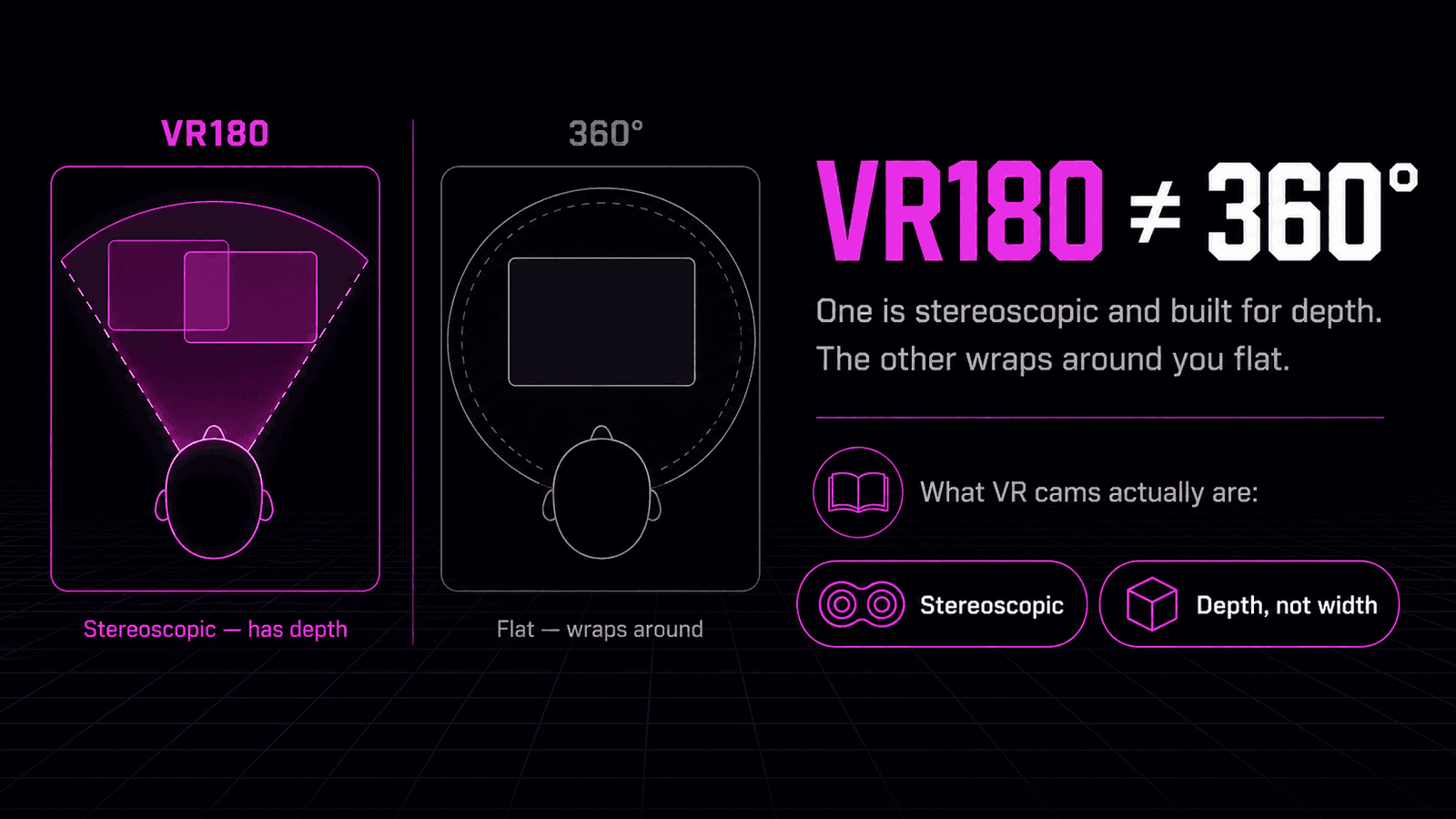
That's the whole idea. "180" describes how much of the world is captured — the forward hemisphere. "Stereoscopic" describes the part that makes it feel three-dimensional — one image per eye. Most of what people mean when they say VR180 sex or VR180 porn is exactly this: a forward-facing 3D scene you watch in a headset, where the subject appears to have depth and scale rather than sitting on a screen.
Where the depth comes from
The depth in VR180 isn't an effect layered on afterward. It's captured at the source, the same way your own vision works.
Your two eyes sit a few centimetres apart, so each one sees the world from a slightly different angle. Your brain reads the difference between those two views — the parallax — and turns it into a sense of distance. VR180 recreates that by filming with two lenses set roughly eye-width apart:
- Two lenses, two images. Each lens records its own picture of the scene, offset just like your eyes are.
- One image per eye in the headset. The player feeds the left image to your left eye and the right image to your right eye.
- Your brain does the rest. It fuses them into a single 3D scene, and the subject reads as solid and present.
This is the reason a good VR180 scene feels close in a way flat video never does. A regular 2D camera captures one image and sends it to both eyes, so there's no parallax and nothing to read as depth. VR180 keeps the two views separate all the way to your eyes, which is what puts the person in the room with you.
Key point: Stereoscopic means one image per eye. That single detail — two views instead of one — is the entire difference between a flat video and a scene with real depth.
VR180 vs 360°: why live cams pick 180
VR180 and 360° get lumped together as "VR video," but they solve different problems, and the gap matters once you understand it.
A 360° video wraps a full sphere around you — you can turn your head in any direction, even look straight behind you, and there's image there. The trade-off is that most 360° footage is monoscopic: a single flat image mapped onto the sphere, with no per-eye difference and so no real depth. And because the resolution has to cover the entire sphere, any one direction you're actually looking at gets only a fraction of the detail.
VR180 makes the opposite trade. It gives up the ability to look behind you and spends everything it saves on the part in front:
- Depth over coverage. VR180 is stereoscopic by default — two eyes, real 3D. Full-sphere stereoscopic 360° is possible but much harder to shoot and stream, so most 360° stays flat.
- Detail where you're looking. Concentrating the image into the forward hemisphere means far more resolution lands on the subject instead of being spread across empty space.
- A natural viewing limit. For a scene with one subject in front of the camera, forward is where you look anyway. The missing rear half-sphere is space you were never going to turn toward.
For live cams that last point is decisive. A cam show has a single performer in front of the camera — there's nothing meaningful happening behind it. Filming in 360° would burn resolution and bandwidth on an empty room, while VR180 puts all of it into depth and detail on the one thing you're watching. That's why VR180 is the standard for live VR180 sex cams and porn, and why 360° stays mostly in the world of pre-recorded scenic video, where looking around is the point.
| VR180 | 360° | |
|---|---|---|
| Coverage | Forward half-sphere | Full sphere |
| Depth | Stereoscopic 3D (per eye) | Usually flat (monoscopic) |
| Detail | Concentrated on the subject | Spread across everything |
| Best for | A single subject in front of you | Looking around a whole space |
How you watch VR180
How you play VR180 depends on whether it's live or a saved file, and the two paths are worth keeping separate.
Live VR180 cams play directly in your headset's web browser, using WebXR — the web standard for immersive content. There's no app to install and no PC in the loop. You open the site in the browser, pick a live room, and tap the player's "Enter VR" control to drop into the immersive, 3D view. On a Meta Quest the built-in browser supports WebXR natively; on Pico, the free Wolvic browser handles it more reliably than the default one.
Pre-recorded VR180 files work differently. A standalone .mp4 filmed in VR180 needs a dedicated VR video player to split the side-by-side stereoscopic image and send each half to the right eye. That's the player type people mean when they talk about opening a file in a VR headset — it exists specifically to unpack the two views. Live browser-based cams skip that step entirely, because the WebXR player in the browser does the same job in real time.
Either way, the requirement is the same at the core: a WebXR-capable VR headset. Beyond that, live cams ask nothing more than opening a browser tab, and our step-by-step guide to watching VR cams covers that sequence for any headset. New to the format overall? Our what are VR cams explainer starts from the beginning, and VR cam shows explained covers what the live show itself is like.
Note: Whether a given room is actually broadcasting in VR is reported by the platform's provider feed rather than something verified stream-by-stream on our side. When the feed marks a room as VR, that's the flag that switches on the stereoscopic view.
Why VR180 sometimes looks flat
A common first reaction to VR180 is that it looks flat — like ordinary video with no depth at all. Almost always, that means you're not actually seeing it in stereoscopic mode yet, and there are a few reasons why.
You're still in 2D. Most players open in a flat window first and switch to 3D only when you enter VR mode. Until you tap the VR / 2D toggle into VR, both your eyes get the same single image, so there's no parallax and no depth. This is the number one cause, and it's a one-tap fix.
The room isn't broadcasting in VR. The stereoscopic effect only exists if the source is genuinely a two-lens VR180 feed. If a room is flagged as a standard 2D stream by the provider feed, there's no second image to give your eyes, so it stays flat no matter what your player does.
The connection is straining. Stereoscopic video is bandwidth-heavy, because each eye receives its own full image. On a weak signal a player may soften the picture or fall back toward a flatter, lower-detail view to keep the stream running. A strong 5 GHz or 6 GHz Wi-Fi signal is what keeps the depth and sharpness intact.
The useful thing to take from this: "flat" is a symptom, not the format. Real VR180, played in VR mode from a genuine stereoscopic feed on a solid connection, has clear, obvious depth. If it looks flat, one of those three things is the reason — and the first one, the VR toggle, is by far the most common.
Good to know: Depth is the whole point of VR180. If a scene looks flat, check the VR toggle first — you're probably watching a 3D feed in 2D mode.
Bottom line
VR180 is stereoscopic 180° video: two forward-facing lenses, one image per eye, real depth across the half-sphere in front of you. It gives up the full-sphere freedom of 360° and spends everything it saves on sharper detail and genuine 3D where you're actually looking — which is exactly why it's the format live VR180 sex cams and porn are built on. Watch it in VR mode on a WebXR-capable headset and the subject has depth and presence; see it flat, and you're almost certainly just looking at a 3D feed in 2D.
Ready to see stereoscopic VR180 for yourself? Browse our live VR cam models or check who's most popular right now.
Frequently asked questions
What is VR180?
VR180 is a stereoscopic 180-degree video format. Two forward-facing lenses record a separate image for each eye across a half-sphere in front of the camera, so your brain reads the scene with real depth in a VR headset instead of as a flat picture.
What is the difference between VR180 and 360°?
VR180 covers the forward half-sphere in stereoscopic 3D, so you get depth but can only look forward. 360° wraps a full sphere you can turn all the way around in, but it's usually flatter and spreads its resolution across the whole scene. VR180 trades the ability to look behind you for stronger, sharper 3D in front of you.
Why do VR180 sex cams use 180° instead of 360°?
A cam show has one subject in front of the camera, so a full 360° sphere would spend resolution and bandwidth on the empty space behind it. VR180 puts all the detail and stereoscopic depth where the performer actually is, which is why it's the standard format for live VR180 porn and cam shows.
Why does VR180 sometimes look flat?
If a VR180 stream looks flat, you're usually seeing it in 2D rather than stereoscopic 3D — the depth only appears once the player is in VR mode and each eye receives its own image. A weak connection or a room that isn't actually broadcasting in VR can also strip the 3D effect back to a flat picture.
How do you watch VR180 video?
You open it in a VR headset. For live VR180 cams, the stream plays in the headset's web browser using WebXR — you pick a room and switch to VR mode, no app required. Pre-recorded VR180 files are watched in a dedicated VR video player instead.
Do you need a special player for VR180?
For live VR180 cams, no — the headset's web browser handles it through WebXR. Standalone VR180 video files do need a VR-capable player to split the stereoscopic image into a left and right eye view, but live browser-based cams skip that step entirely.